 

|
for Any GPU
NVIDIA / AMD / Intel |
for NVIDIA GPU
8Gb VRAM or more |
[](https://github.com/Gourieff/sd-webui-reactor/commits/main)  [](https://github.com/Gourieff/sd-webui-reactor/issues?cacheSeconds=0) [](https://github.com/Gourieff/sd-webui-reactor/issues?q=is%3Aissue+is%3Aclosed)  English | [Русский](/README_RU.md) # ReActor for Stable Diffusion


 ## Installation
[Automatic1111](#a1111) | [Vladmandic SD.Next](#sdnext) | [Google Colab SD WebUI](#colab)
## Installation
[Automatic1111](#a1111) | [Vladmandic SD.Next](#sdnext) | [Google Colab SD WebUI](#colab)
 ### Face Indexes
ReActor detects faces in images in the following order:
### Face Indexes
ReActor detects faces in images in the following order: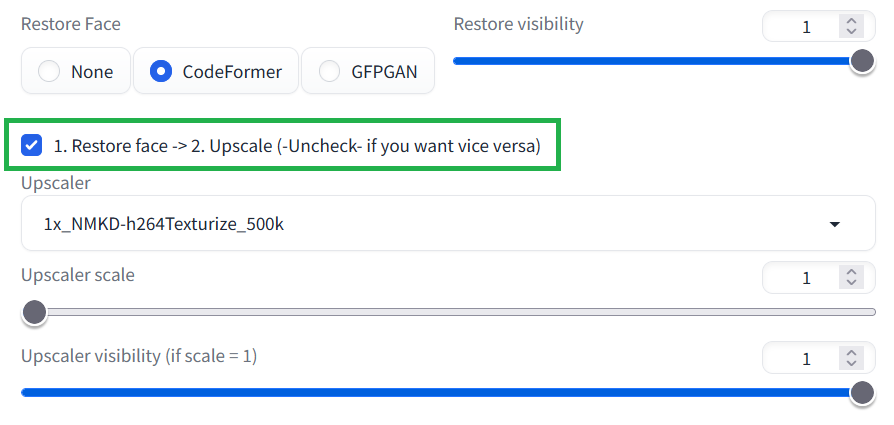 *The old logic was the opposite (Upscale -> then Restore), resulting in worse face quality (and big texture differences) after upscaling.*
### There are multiple faces in result
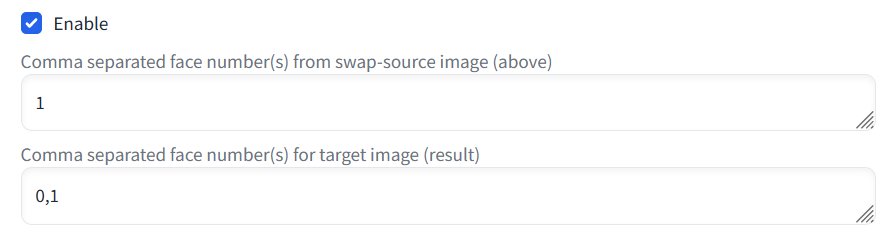
Select the face numbers you wish to swap using the "Comma separated face number(s)" option for swap-source and result images. You can use different index order.
*The old logic was the opposite (Upscale -> then Restore), resulting in worse face quality (and big texture differences) after upscaling.*
### There are multiple faces in result
Select the face numbers you wish to swap using the "Comma separated face number(s)" option for swap-source and result images. You can use different index order.
 ### ~~The result is totally black~~
~~This means NSFW filter detected that your image is NSFW.~~
### ~~The result is totally black~~
~~This means NSFW filter detected that your image is NSFW.~~
 ### Img2Img
You can choose to activate the swap on the source image or on the generated image, or on both using the checkboxes. Activating on source image allows you to start from a given base and apply the diffusion process to it.
ReActor works with Inpainting - but only the masked part will be swapped.
### Img2Img
You can choose to activate the swap on the source image or on the generated image, or on both using the checkboxes. Activating on source image allows you to start from a given base and apply the diffusion process to it.
ReActor works with Inpainting - but only the masked part will be swapped. - Click 'Apply and restart UI'
Alternative solutions:
- https://github.com/Gourieff/sd-webui-reactor/issues/3#issuecomment-1615919243
- https://github.com/Gourieff/sd-webui-reactor/issues/39#issuecomment-1666559134 (can be actual, if you use Vladmandic SD.Next)
### **IV. "AttributeError: 'FaceSwapScript' object has no attribute 'enable'"**
You need to disable the "SD-CN-Animation" extension (or perhaps some another that causes the conflict)
### **V. "INVALID_PROTOBUF : Load model from <...>\models\insightface\inswapper_128.onnx failed:Protobuf parsing failed" OR "AttributeError: 'NoneType' object has no attribute 'get'" OR "AttributeError: 'FaceSwapScript' object has no attribute 'save_original'"**
This error may occur if there's smth wrong with the model file `inswapper_128.onnx`
Try to download it manually from [here](https://github.com/facefusion/facefusion-assets/releases/download/models/inswapper_128.onnx)
and put it to the `stable-diffusion-webui\models\insightface` replacing existing one
### **VI. "ValueError: This ORT build has ['TensorrtExecutionProvider', 'CUDAExecutionProvider', 'CPUExecutionProvider'] enabled" OR "ValueError: This ORT build has ['AzureExecutionProvider', 'CPUExecutionProvider'] enabled"**
1. Close (stop) your SD WebUI Server if it's running
2. Go to the (Windows)`venv\Lib\site-packages` or (MacOS/Linux)`venv/lib/python3.10/site-packages` and see if there are any folders with names start from "~" (for example "~rotobuf"), delete them
3. Go to the (Windows)`venv\Scripts` or (MacOS/Linux)`venv/bin` run Terminal or Console (cmd) there and type `activate`
4. Then:
- `python -m pip install -U pip`
- `pip uninstall -y onnx onnxruntime onnxruntime-gpu onnxruntime-silicon onnxruntime-extensions`
- `pip install onnx==1.14.1 onnxruntime==1.15.1`
If it didn't help - it seems that you have another extension reinstalling `onnxruntime` when SD WebUI checks requirements. Please see your extensions list. If you find there "WD14 tagger" - try to disable it and then follow the steps above once again. This extension causes reinstalling of `onnxruntime` to `onnxruntime-gpu` or `onnxruntime==1.16.0` every time SD WebUI runs.
- Click 'Apply and restart UI'
Alternative solutions:
- https://github.com/Gourieff/sd-webui-reactor/issues/3#issuecomment-1615919243
- https://github.com/Gourieff/sd-webui-reactor/issues/39#issuecomment-1666559134 (can be actual, if you use Vladmandic SD.Next)
### **IV. "AttributeError: 'FaceSwapScript' object has no attribute 'enable'"**
You need to disable the "SD-CN-Animation" extension (or perhaps some another that causes the conflict)
### **V. "INVALID_PROTOBUF : Load model from <...>\models\insightface\inswapper_128.onnx failed:Protobuf parsing failed" OR "AttributeError: 'NoneType' object has no attribute 'get'" OR "AttributeError: 'FaceSwapScript' object has no attribute 'save_original'"**
This error may occur if there's smth wrong with the model file `inswapper_128.onnx`
Try to download it manually from [here](https://github.com/facefusion/facefusion-assets/releases/download/models/inswapper_128.onnx)
and put it to the `stable-diffusion-webui\models\insightface` replacing existing one
### **VI. "ValueError: This ORT build has ['TensorrtExecutionProvider', 'CUDAExecutionProvider', 'CPUExecutionProvider'] enabled" OR "ValueError: This ORT build has ['AzureExecutionProvider', 'CPUExecutionProvider'] enabled"**
1. Close (stop) your SD WebUI Server if it's running
2. Go to the (Windows)`venv\Lib\site-packages` or (MacOS/Linux)`venv/lib/python3.10/site-packages` and see if there are any folders with names start from "~" (for example "~rotobuf"), delete them
3. Go to the (Windows)`venv\Scripts` or (MacOS/Linux)`venv/bin` run Terminal or Console (cmd) there and type `activate`
4. Then:
- `python -m pip install -U pip`
- `pip uninstall -y onnx onnxruntime onnxruntime-gpu onnxruntime-silicon onnxruntime-extensions`
- `pip install onnx==1.14.1 onnxruntime==1.15.1`
If it didn't help - it seems that you have another extension reinstalling `onnxruntime` when SD WebUI checks requirements. Please see your extensions list. If you find there "WD14 tagger" - try to disable it and then follow the steps above once again. This extension causes reinstalling of `onnxruntime` to `onnxruntime-gpu` or `onnxruntime==1.16.0` every time SD WebUI runs.